
Hosting Declarative Markdown-Based Agents on Azure Functions
Thursday, February 19, 2026
Like many of you, the Azure Functions team and others at Microsoft have been building agents for our day-to-day work using mostly markdown and configuration: like AGENTS.md instructions, skills, and Model Context Protocol (MCP) tools. These sophisticated and powerful agents run locally right in VS Code or the Copilot CLI.
But inevitably, the question comes up: "How do I share this agent with my team by running it in the cloud?"
Today, we're sharing an experimental feature that lets you host these declarative markdown-based agent projects directly on Azure Functions.
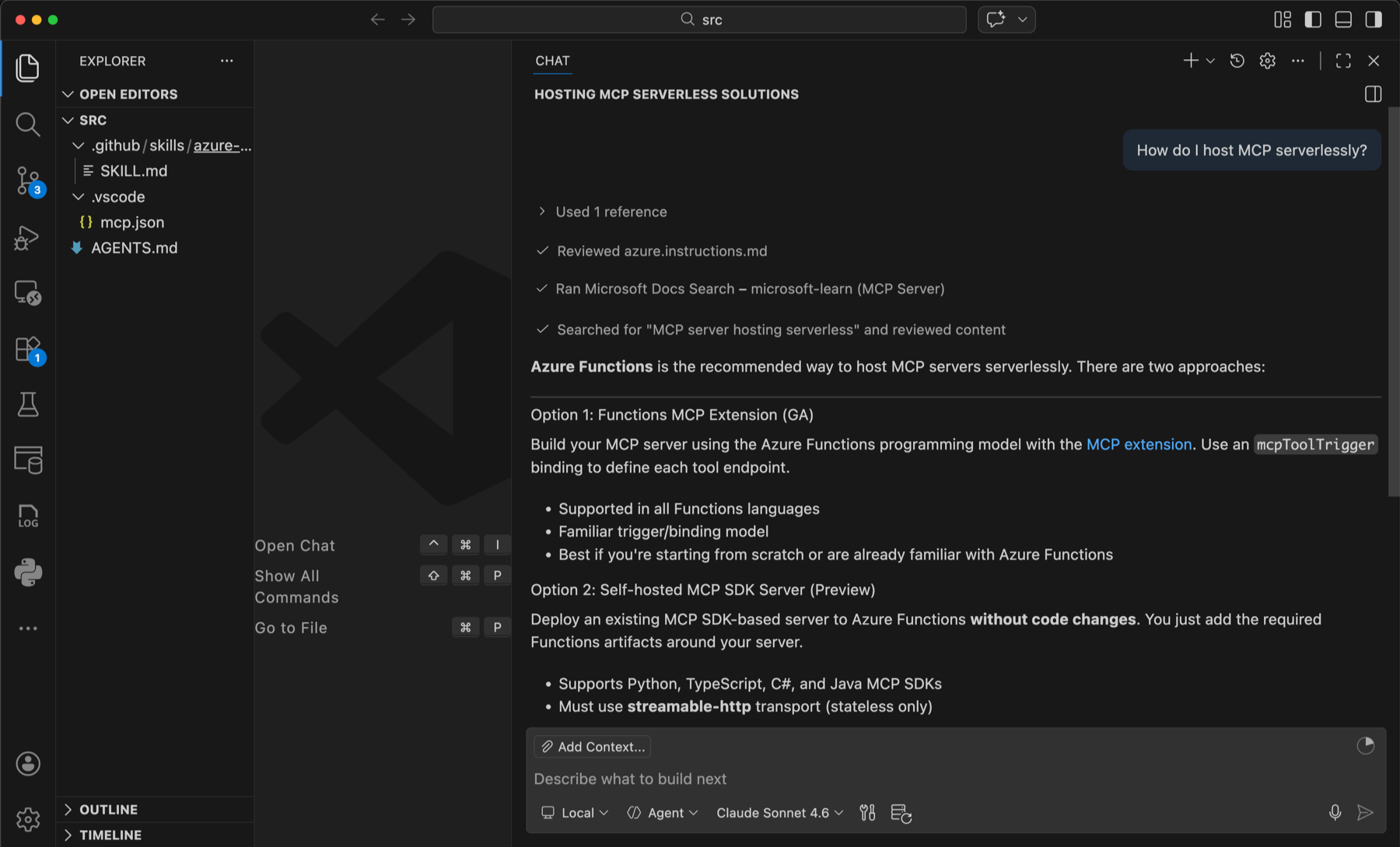
From Local to Cloud
What makes this powerful is that the "source code" for your cloud agent is identical to what you run locally in GitHub Copilot. The project structure typically looks like this:
src/
├── AGENTS.md             # Your agent's personality and instructions
├── .github/skills/       # Reusable skills
├── .vscode/mcp.json      # MCP server configurations
└── tools/                # Custom Python tools
You can check out the demo repository to see the full example (look in the /src folder).
Locally, Copilot Chat automatically uses these files to run your agent. When you deploy this to Azure Functions, a specialized harness takes over. It's powered by the new GitHub Copilot SDK, which understands this project structure natively and exposes your agent as a scalable HTTP API and MCP server.
Deploying with One Command
We wanted deployment to be as seamless as the local development experience. Using the Azure Developer CLI (azd), you can get your agent running in the cloud in minutes.
From your project folder, you just run:
azd up
Behind the scenes, azd packages your agent project into an Azure Functions app and deploys it along with any necessary resources.
During deployment, you'll be asked to select a model; this can be either model from GitHub or Microsoft Foundry. If you select a Foundry model, we'll create a new deployment for you and link it to your agent.
We also automatically configure an Azure file share for your agent's chat history. This allows your agent to maintain session state even when the function app scales out or you return to chat with it after a few days.
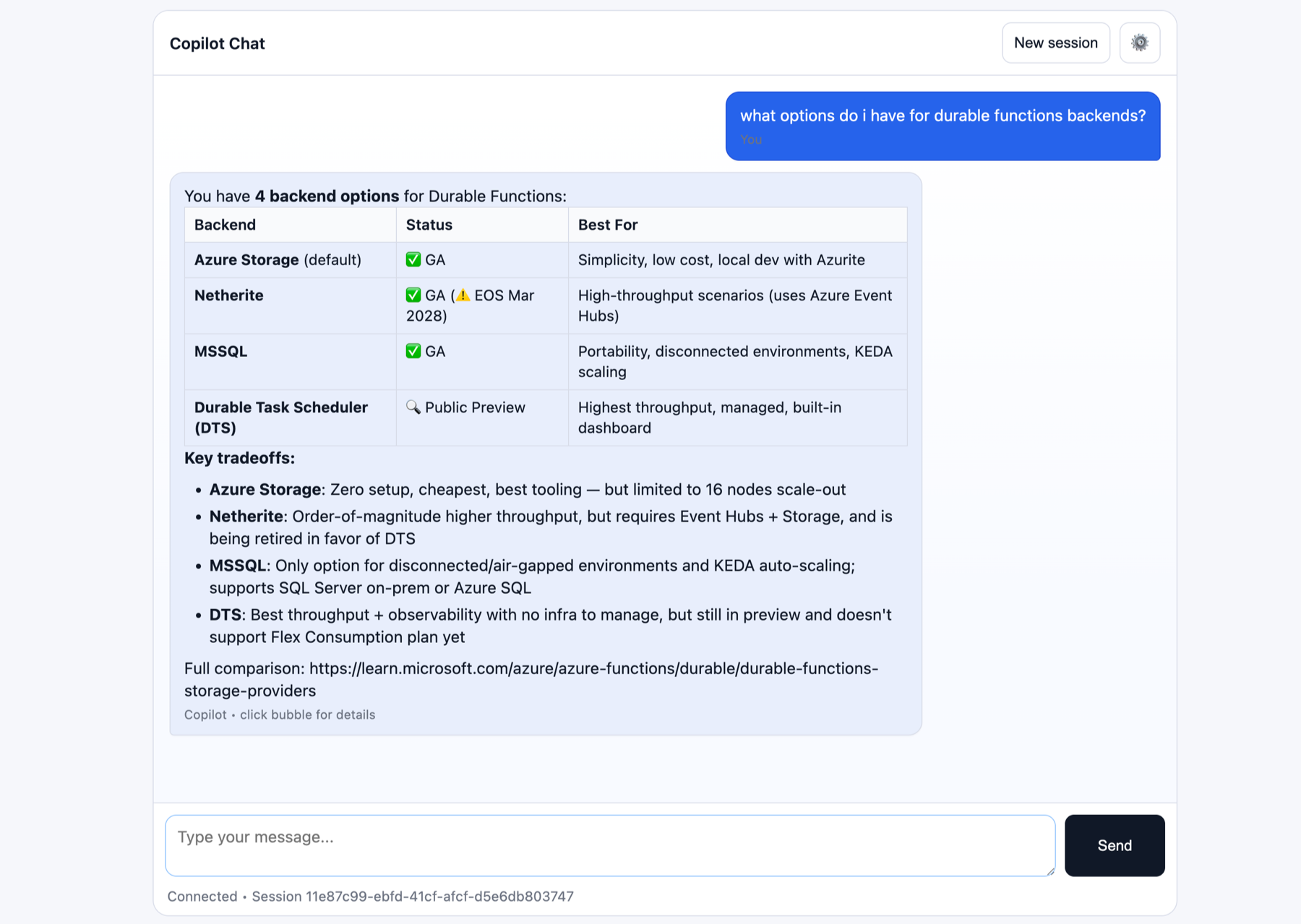
Once deployed, you don't just get an HTTP API. The Function App comes with a built-in chat UI available at the root URL (https://<your-function-app-name>.azurewebsites.net/), so you can test and interact with your agent immediately in the browser.
Automatic Endpoints and MCP
What's happening under the hood is pretty interesting. At build time, we generate the necessary triggers.
- Chat Endpoint: An HTTP trigger at
/agent/chat allows applications to invoke your agent via REST. This is what the built-in UI uses. We also just added a streaming SSE endpoint!
- MCP Server: The app also exposes an endpoint at
/runtime/webhooks/mcp. This acts as an MCP server for your agent. You can actually add this URL back into your local VS Code mcp.json configuration, allowing you to chat with your cloud-hosted agent (and its cloud-hosted tools) right from your editor.
Python Tools: No Framework Required
One of the favorite things we added is the ability to write tools using custom code. Sometimes there isn't an MCP server that does what you need.
With this feature, you can simply drop a plain Python file into the src/tools/ folder. You don't need to know the Azure Functions programming model, triggers, or bindings. You just write a standard Python function:
# except from src/tools/cost_estimator.py
async def cost_estimator(params: CostEstimatorParams) -> str:
    """Estimate monthly and annual costs from unit price and usage."""
    monthly_cost = params.unit_price * params.quantity
    annual_cost = monthly_cost * 12
    return f"Monthly: ${monthly_cost:.4f} | Annual: ${annual_cost:.4f}"
The runtime automatically discovers this function, registers it as a tool for the agent, and handles the execution. If you need external libraries, just add them to src/requirements.txt.
Event-Driven Agents
Since we are running on Azure Functions, we can go beyond just request/response interactions. We've started adding support for event triggers directly in the frontmatter at the top of AGENTS.md.
For example, you can schedule your agent to run a prompt on a timer:
---
functions:
  - name: morningBriefing
    trigger: timer
    schedule: "0 0 8 * * *"
    prompt: "Check the latest build status and summarize any new critical issues."
---
This effectively turns your agent into an autonomous background worker that can perform tasks, analyze data, or send notifications without human intervention.
Try It Out
This is very much an experiment, but we're excited to see what people build with it. It bridges the gap between local declarative agent definition and real-world cloud deployment.
You can check out the repository for full instructions, code samples, and to try it out yourself:
https://github.com/Azure-Samples/functions-markdown-agent
Let us know what you think!
Like many of you, the Azure Functions team and others at Microsoft have been building agents for our day-to-day work using mostly markdown and configuration: like AGENTS.md instructions, skills, and Model Context Protocol (MCP) tools. These sophisticated and powerful agents run locally right in VS Code or the Copilot CLI.
But inevitably, the question comes up: "How do I share this agent with my team by running it in the cloud?"
Today, we're sharing an experimental feature that lets you host these declarative markdown-based agent projects directly on Azure Functions.
From Local to Cloud
What makes this powerful is that the "source code" for your cloud agent is identical to what you run locally in GitHub Copilot. The project structure typically looks like this:
src/
├── AGENTS.md # Your agent's personality and instructions
├── .github/skills/ # Reusable skills
├── .vscode/mcp.json # MCP server configurations
└── tools/ # Custom Python tools
You can check out the demo repository to see the full example (look in the /src folder).
Locally, Copilot Chat automatically uses these files to run your agent. When you deploy this to Azure Functions, a specialized harness takes over. It's powered by the new GitHub Copilot SDK, which understands this project structure natively and exposes your agent as a scalable HTTP API and MCP server.
Deploying with One Command
We wanted deployment to be as seamless as the local development experience. Using the Azure Developer CLI (azd), you can get your agent running in the cloud in minutes.
From your project folder, you just run:
azd up
Behind the scenes, azd packages your agent project into an Azure Functions app and deploys it along with any necessary resources.
During deployment, you'll be asked to select a model; this can be either model from GitHub or Microsoft Foundry. If you select a Foundry model, we'll create a new deployment for you and link it to your agent.
We also automatically configure an Azure file share for your agent's chat history. This allows your agent to maintain session state even when the function app scales out or you return to chat with it after a few days.
Once deployed, you don't just get an HTTP API. The Function App comes with a built-in chat UI available at the root URL (https://<your-function-app-name>.azurewebsites.net/), so you can test and interact with your agent immediately in the browser.
Automatic Endpoints and MCP
What's happening under the hood is pretty interesting. At build time, we generate the necessary triggers.
- Chat Endpoint: An HTTP trigger at
/agent/chatallows applications to invoke your agent via REST. This is what the built-in UI uses. We also just added a streaming SSE endpoint! - MCP Server: The app also exposes an endpoint at
/runtime/webhooks/mcp. This acts as an MCP server for your agent. You can actually add this URL back into your local VS Codemcp.jsonconfiguration, allowing you to chat with your cloud-hosted agent (and its cloud-hosted tools) right from your editor.
Python Tools: No Framework Required
One of the favorite things we added is the ability to write tools using custom code. Sometimes there isn't an MCP server that does what you need.
With this feature, you can simply drop a plain Python file into the src/tools/ folder. You don't need to know the Azure Functions programming model, triggers, or bindings. You just write a standard Python function:
# except from src/tools/cost_estimator.py
async def cost_estimator(params: CostEstimatorParams) -> str:
"""Estimate monthly and annual costs from unit price and usage."""
monthly_cost = params.unit_price * params.quantity
annual_cost = monthly_cost * 12
return f"Monthly: ${monthly_cost:.4f} | Annual: ${annual_cost:.4f}"
The runtime automatically discovers this function, registers it as a tool for the agent, and handles the execution. If you need external libraries, just add them to src/requirements.txt.
Event-Driven Agents
Since we are running on Azure Functions, we can go beyond just request/response interactions. We've started adding support for event triggers directly in the frontmatter at the top of AGENTS.md.
For example, you can schedule your agent to run a prompt on a timer:
---
functions:
- name: morningBriefing
trigger: timer
schedule: "0 0 8 * * *"
prompt: "Check the latest build status and summarize any new critical issues."
---
This effectively turns your agent into an autonomous background worker that can perform tasks, analyze data, or send notifications without human intervention.
Try It Out
This is very much an experiment, but we're excited to see what people build with it. It bridges the gap between local declarative agent definition and real-world cloud deployment.
You can check out the repository for full instructions, code samples, and to try it out yourself: https://github.com/Azure-Samples/functions-markdown-agent
Let us know what you think!